
ADVANCE DATA ANALYSIS
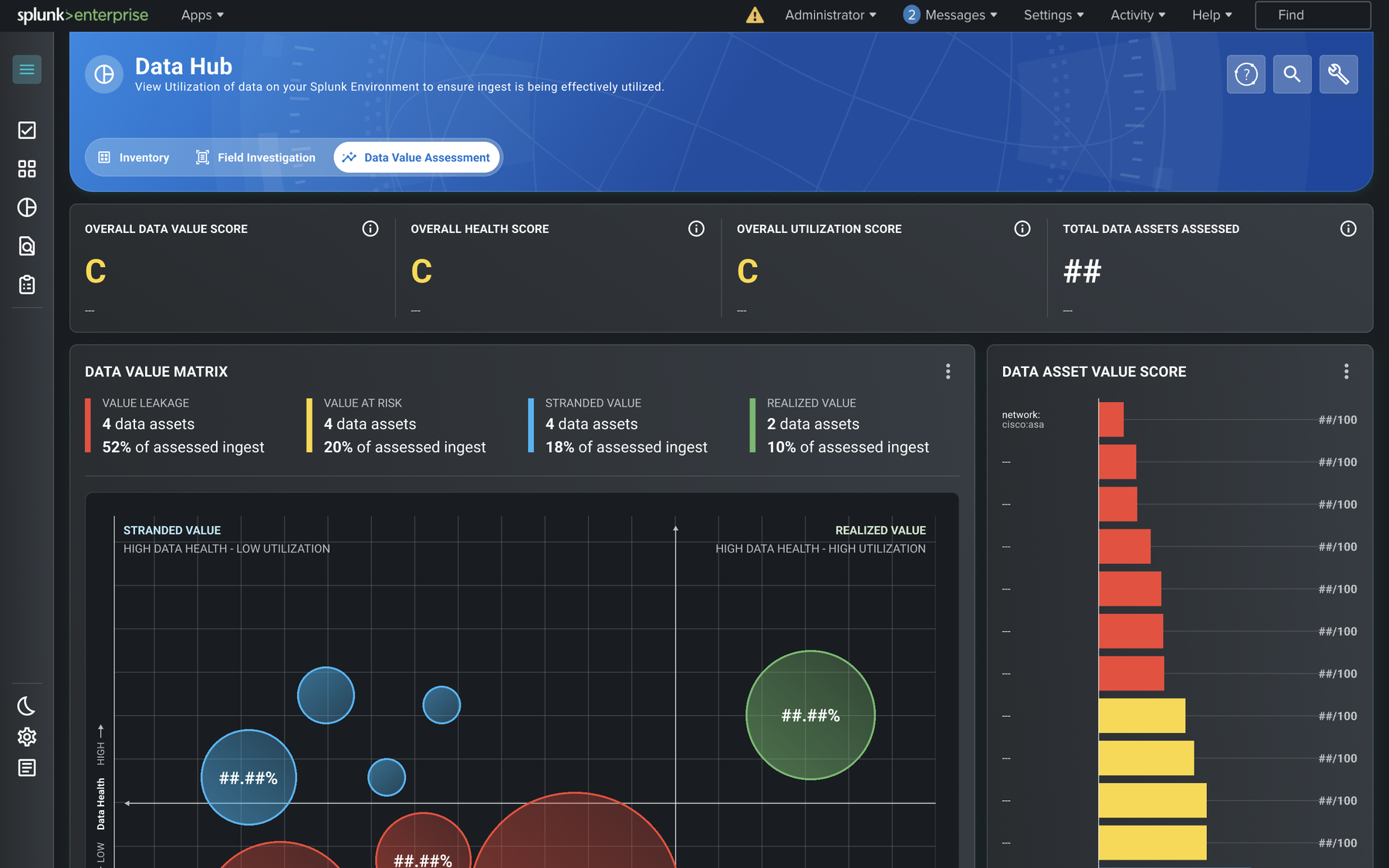
Splunk environments can contain large volumes of data that vary in health, utilization, cost, and business value. The Data Value Assessment turns complex data health and utilization findings into a shared value story that pairs an executive summary with an expandable engineering evidence workspace, built around one question: how do you make the same page trustworthy to an executive and useful to an engineer?
The Problem
Engineers could see that a dataset had quality or efficiency issues, but identifying which datasets needed attention, and why, meant reviewing multiple searches, checks, and data sources. The assessment needed to connect a high-level value story to the technical evidence behind it.
Design Goals
Give users an immediate read on overall data value, make the highest-impact datasets easy to find, explain how each score was calculated, and let engineers trace any finding down to its measured result and supporting SPL, all while keeping the scoring weighting configurable and every threshold transparent even where it isn't.
Defining the Scoring Model
Two Pillars Instead of One Score
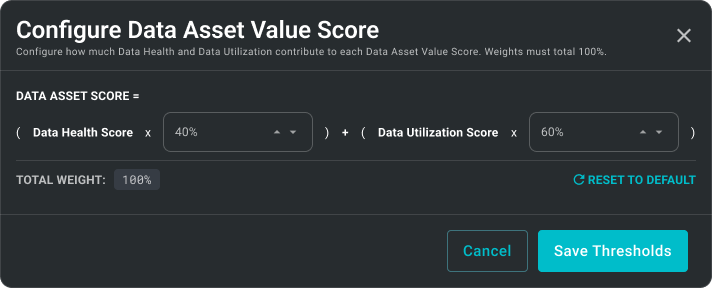
Each data asset runs through 12 checks, six for Data Health and six for Data Utilization. Those roll up into two pillar scores, then combine into one Data Asset Value Score: (Data Health Score × 40%) + (Data Utilization Score × 60%). I kept Health and Utilization visible as two separate scores instead of blending everything into one number from the start.
A single blended score hides why a dataset scored the way it did: a quality problem, a usage problem, or both. An executive and an engineer need that distinction for different reasons. An executive uses it to judge how serious an issue is; an engineer uses it to know which of the twelve checks to investigate first. Keeping the pillars separate answers both without making either person do the other's math.
Fixed Thresholds, Adjustable Weighting
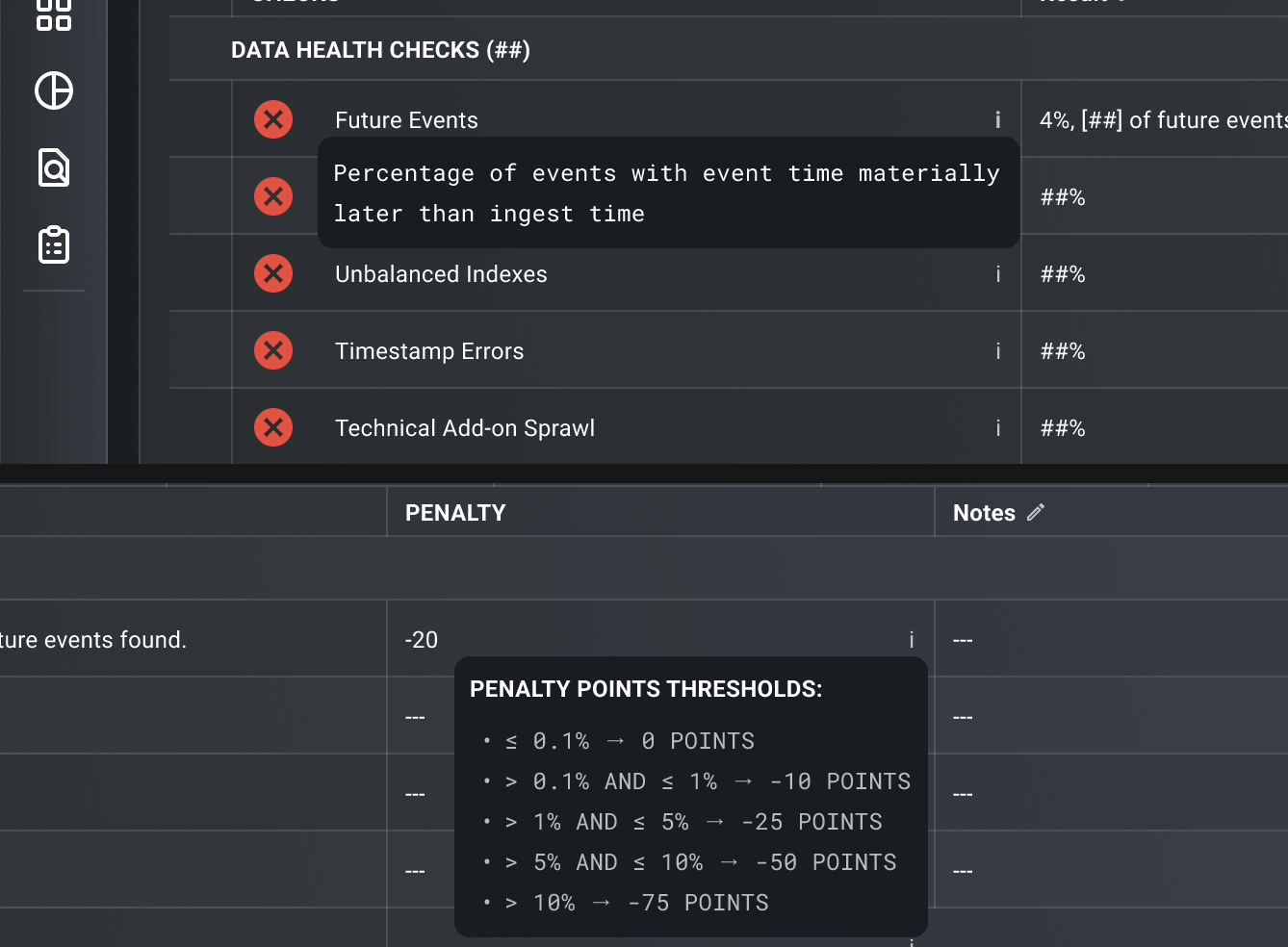
Check thresholds, the cutoffs that turn a measured result into a penalty, like a future-event rate over 10% costing -75 points, aren't something users can edit yet. That mapping is fixed. What is adjustable is weighting: how much each pillar, Health and Utilization, contributes to the overall Data Asset Value Score (40% health, 60% utilization by default).
Since the thresholds themselves are locked, people still needed to see the logic behind a penalty without being able to touch it. So instead of building a settings screen for something no one could change yet, I surfaced that logic as a hover tooltip: what a check measures, and the exact thresholds that turn its result into a penalty, right next to the number it produced.
Executive Summary & the Value Matrix
Choosing a Matrix Over a Ranked List
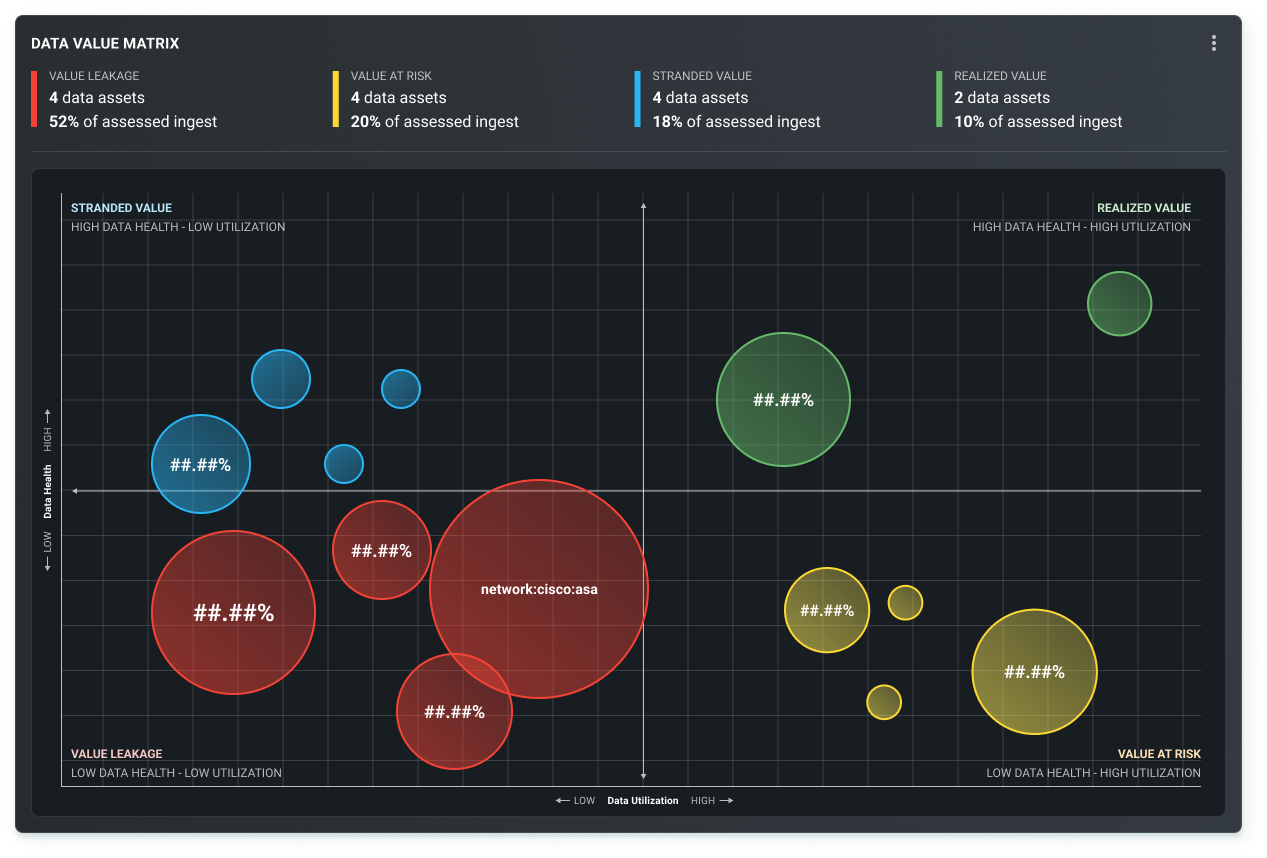
Health and utilization are independent: a dataset can be healthy but barely used, or heavily used but degrading. A ranked list of scores collapses that distinction into one sortable column, so I used a health-and-utilization matrix instead. It positions every asset by its two pillar scores, with bubble size showing ingest volume and color showing value classification.
That matters because the two failure modes call for different responses: an unhealthy dataset needs an engineering fix, a healthy-but-underused one needs a usage conversation. A single ranked number would have flattened that difference. The matrix lets users tell the two apart at a glance instead of opening each row to find out.
Four Classifications as a Translation Layer
Realized Value, Stranded Value, Value at Risk, and Value Leakage translate two numeric scores into language a non-technical stakeholder can act on, without needing to understand what any individual check measures. A score by itself doesn't tell someone what to do; a classification does.
"Value Leakage" reads as a call to action in a way that "Health: 34, Utilization: 22" never will. This closed the gap between how engineers measure a dataset and how a business conversation about that dataset actually happens.
Connecting the Matrix to the Table
Selecting a bubble or a classification filters the matching rows in the data grid below, so the matrix and the table aren't two disconnected views of the same assessment. Without that link, a conversation about "that bubble in the top-left" means someone manually searching the table for a matching dataset, slow, error-prone, and easy to get wrong live.
Wiring the two together directly fixed that. The matrix became a filter, not just a picture, so the executive-facing summary and the engineering-facing evidence always stayed backed by the exact same selection.
Dataset Evidence & Configuration
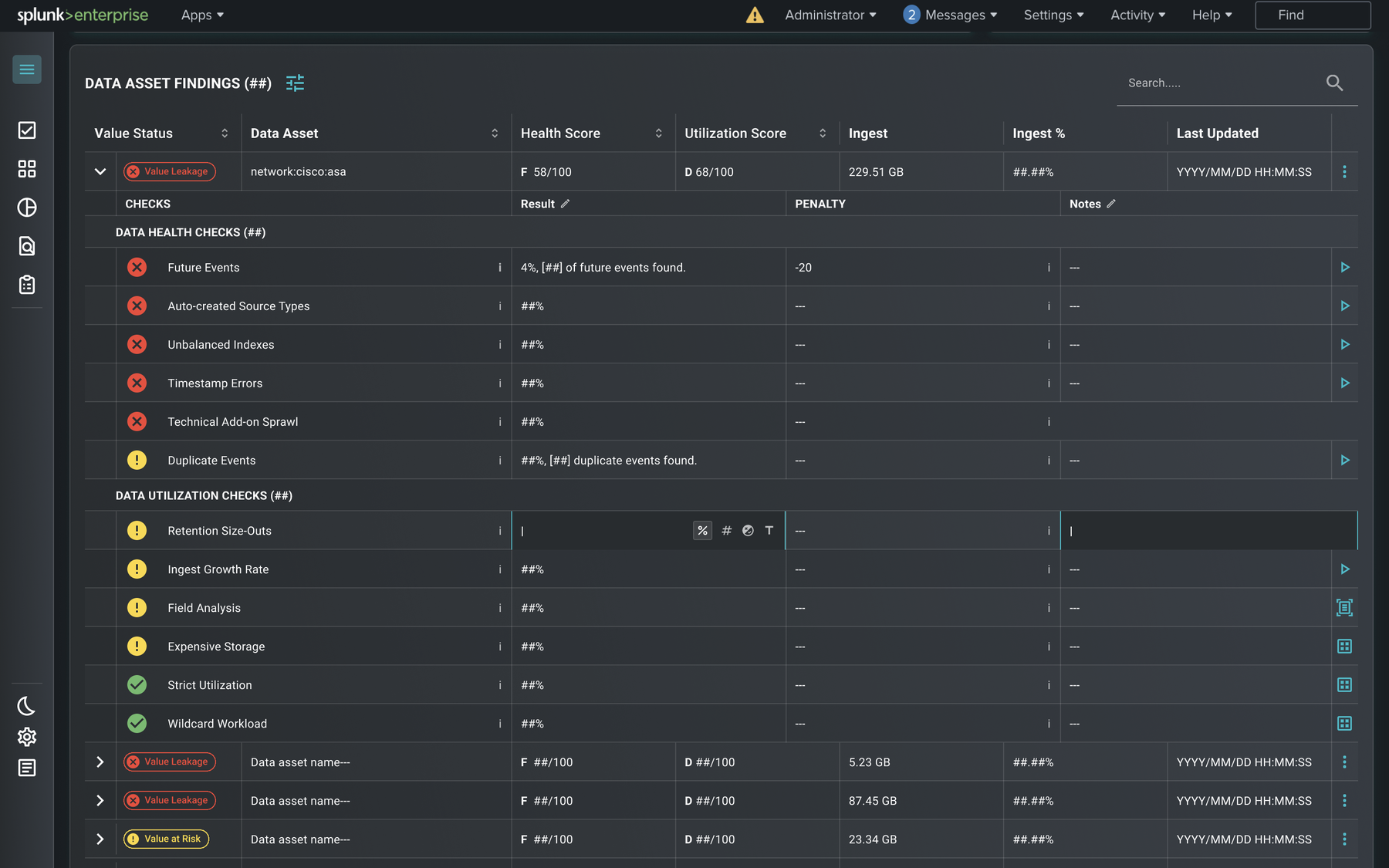
Building a Traceable Evidence Path
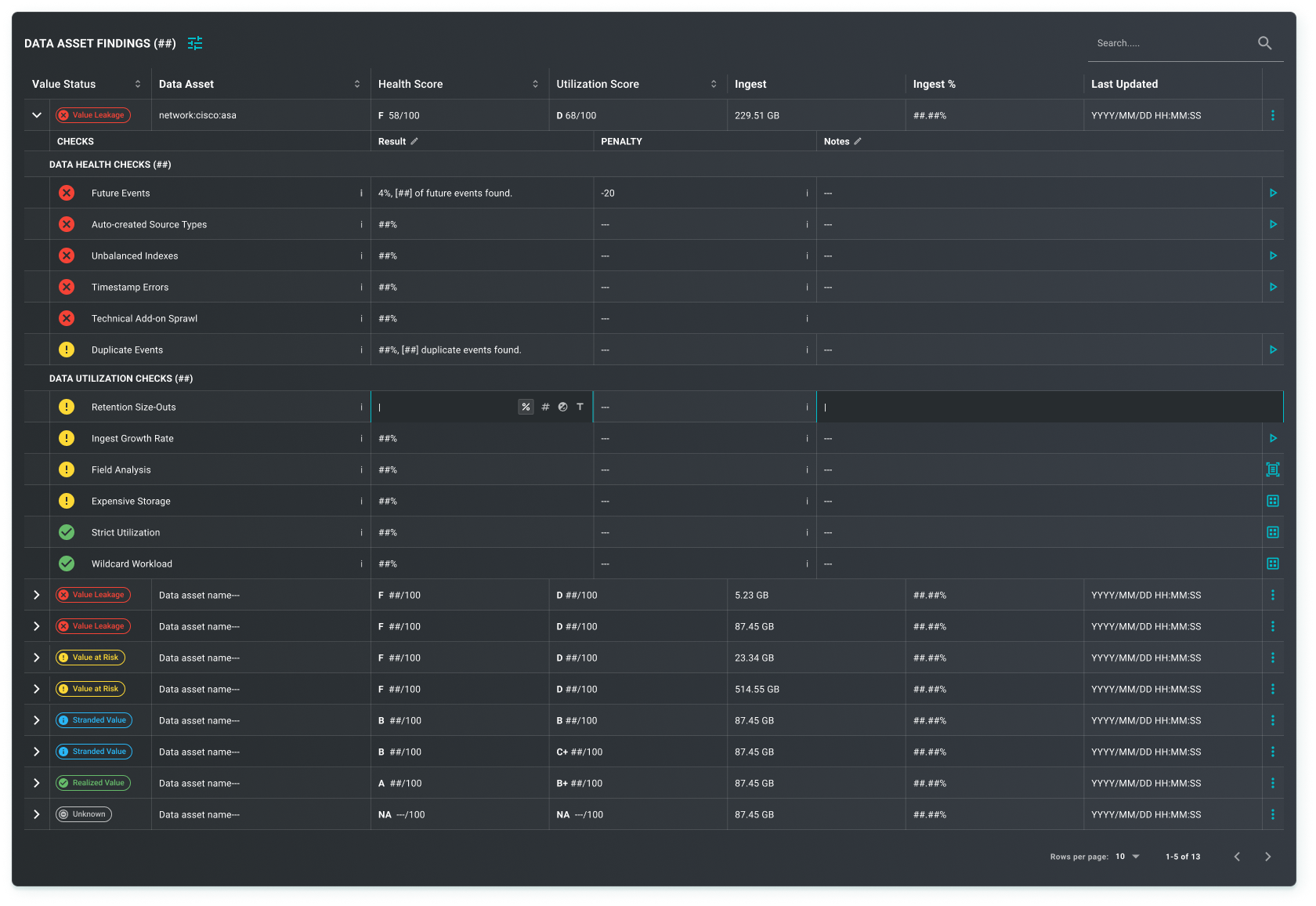
An engineer won't act on a classification they can't verify, so I made every finding traceable end to end: Classification → Dataset scores → Individual check → Measured result → Supporting SPL. Expanding a dataset row reveals the checks behind its score, and each check links straight to the SPL search that produced it in Splunk Search.
An assessment tool only earns trust if its conclusions are auditable, not just asserted. Instead of presenting a classification as a verdict, the interface treats it as the start of an investigation. That turned the assessment from a report engineers had to take on faith into a tool they could actually use to do the work.
Why the Value Score Is Optional, Not Default
The full numeric Data Asset Value Score is an optional column, not one shown by default. Showing it for every row would widen the table and compete for attention with the classification, the signal most users actually need to act on.
Making it opt-in solved the trade-off without cutting the feature. Engineers who want the precise number can turn it on, and everyone else gets a table that stays legible instead of getting denser every time more numeric detail gets added.
Guardrails on the Weighting Split
Weighting is the one part of the formula people can actually change: how much Health and Utilization each contribute to the Data Asset Value Score. That flexibility comes with an obvious way to break it, two percentages that don't add up to 100, so the modal tracks the total live as either field changes and won't let a mismatched split get saved.
A reset-to-default control sits right next to it, so undoing an experiment is one click instead of remembering what the original 40/60 split was and typing it back in.
Designing for an Assessment That's Always Moving
Because results refresh continuously, the interface has to communicate freshness, last updated time, assessment time range, refresh status, without disrupting someone mid-investigation. The risk was an engineer deep in an expanded dataset row having that row unexpectedly collapse or reset the moment new results came in.
So instead of silently re-rendering underneath the user, the interface surfaces a message: "New assessment results are available. Refresh view." That one choice preserves investigation context while keeping fresh data a single click away.
Outcome
Executives can read the overall health, utilization, and value distribution of the environment without opening a single check. Engineers can identify the highest-priority datasets and investigate them without leaving the assessment. Every classification traces to a pillar score, every pillar score traces to individual check penalties, and every check traces to the SPL that produced it, a full chain that administrators can also tune as the scoring methodology evolves.
The most important outcome is the connection between summary and evidence: the page never forces a choice between a simple dashboard and a technical investigation tool. Every decision above, the split pillars, the matrix, the classifications, the traceable evidence path, keeps those two experiences from competing for the same screen.
"The most important design outcome is the connection between summary and evidence. The page does not force users to choose between a simple dashboard and a technical investigation tool; it provides both layers in one workflow."