
ATLAS PLATFORM REVAMP
Atlas is Presidio's Splunk environment-management and enablement platform, helping Splunk teams understand environment health, govern scheduled searches, and improve data utilization. This case study follows Atlas across three major phases, from a Splunk-native interface, through the React-based Atlas 4.0 rebuild, to the more polished, adoption-ready Atlas 5.0, and what changed at each step.
The Challenge
Splunk admins and engineers work across environments with thousands of searches, dashboards, and data sources. Atlas needed to make all of that organized and actionable so users could prioritize, investigate, and act without losing the technical evidence they depend on.
My Role
As UX Engineer on the Atlas platform, I owned information architecture, interaction design, component behavior, terminology, and enablement content across Search Hub, Data Hub, and Assessment, working closely with product and engineering to turn Splunk operations into clear, usable workflows.

Phase 1: The Original Splunk-Native Experience
Starting Inside Splunk's Own Patterns
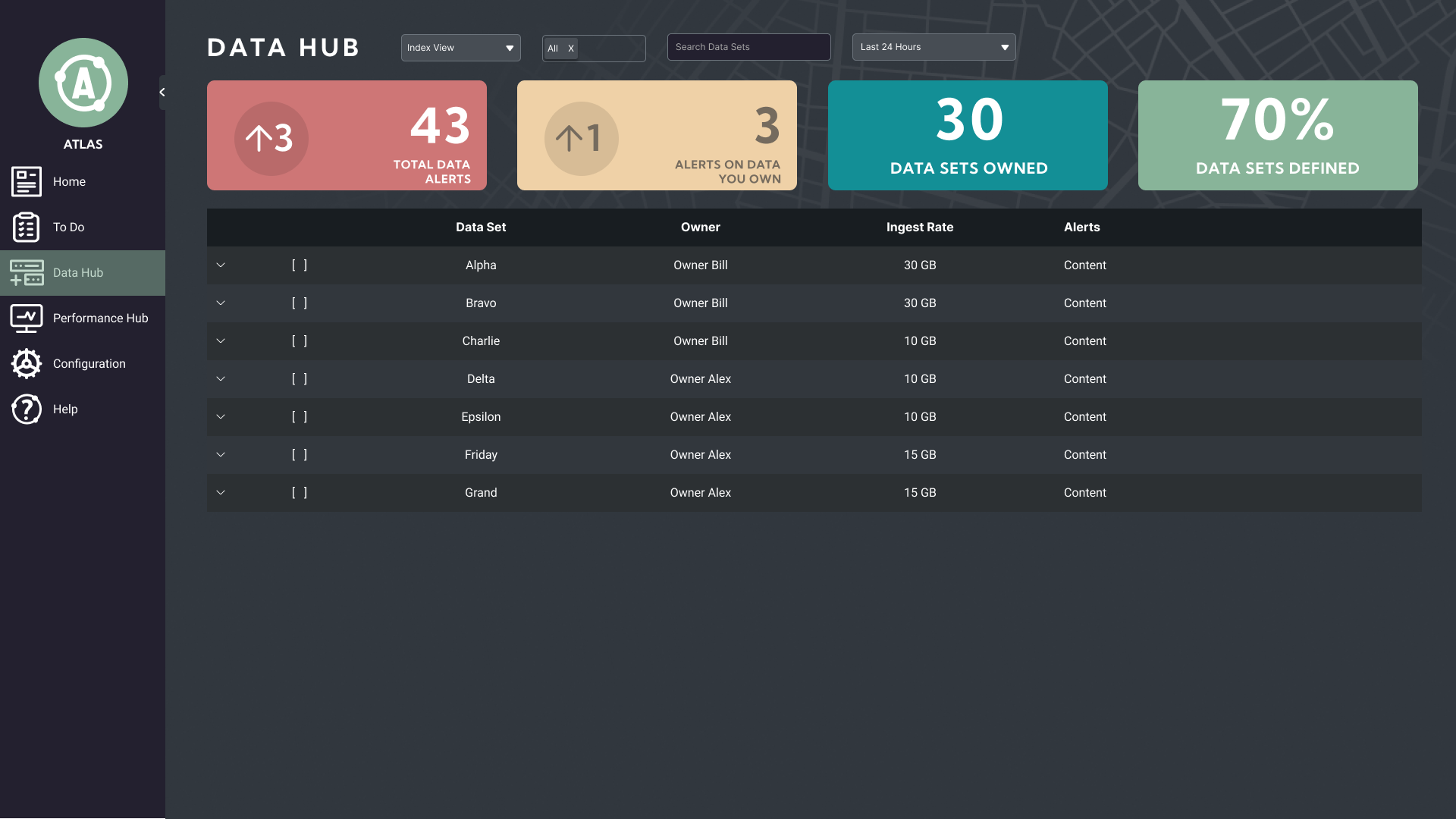
The first version of Atlas used Splunk's own UI conventions: dense tables, configuration-first screens, familiar navigation. That was intentional. Users already knew Splunk, so building inside its existing patterns let the team prove Atlas's value first, instead of asking people to learn a new interface before they had a reason to trust it.
The tradeoff showed up fast. Reusing Splunk's patterns made Atlas easy to adopt, but it also meant inheriting Splunk's weaknesses: dense, disconnected screens where the connection between a finding and the action it should trigger wasn't always clear.
The Cost of Borrowed Patterns
Data health, ingest anomalies, and governance findings all lived in tables that looked and behaved like any other Splunk search result. Nothing in the interface told users which numbers were routine and which ones actually needed attention, so every session started with users doing that interpretive work themselves.
That gap, more than any single missing feature, pointed to what Atlas needed to do next: help people prioritize and interpret information, not just display it.
Phase 2: Atlas 4.0 and the Move to React
Why React, and Why Now
The React rewrite wasn't about chasing new technology. Splunk's UI framework made it hard to build the kind of connected interface Atlas needed. It was built for individual search results and dashboards, not for guiding someone from a summary, into evidence, and out to an action.
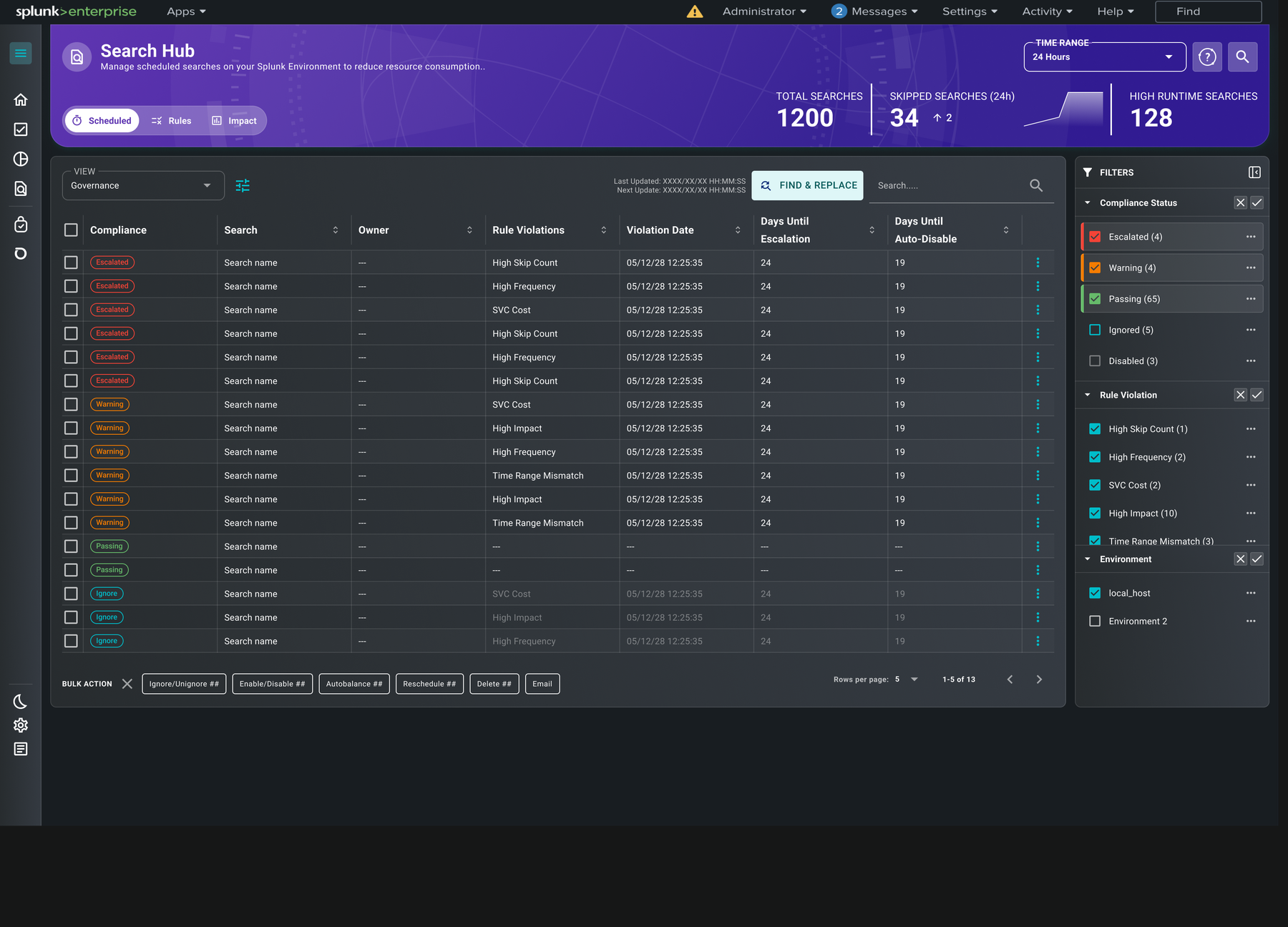
React let the team build once and reuse everywhere: the same summary card, the same detail panel, the same filtering pattern, across Search Hub, Data Hub, and Assessment. That's what made later work, like the explainable findings in 5.0, possible as a platform-wide pattern instead of a one-off fix. Bulk actions are a good example: once a list was filtered down to the searches or datasets someone actually cared about, they could act on all of them at once, in Search Hub or in Data Hub, instead of repeating the same click one row at a time. Building it once in React meant that pattern showed up everywhere a list could be filtered, not just the one place it was first needed. Keeping Splunk's visual and interaction conventions where they still made sense was just as deliberate. It kept Atlas familiar to the users who already trusted it.
Treating Atlas as One Platform
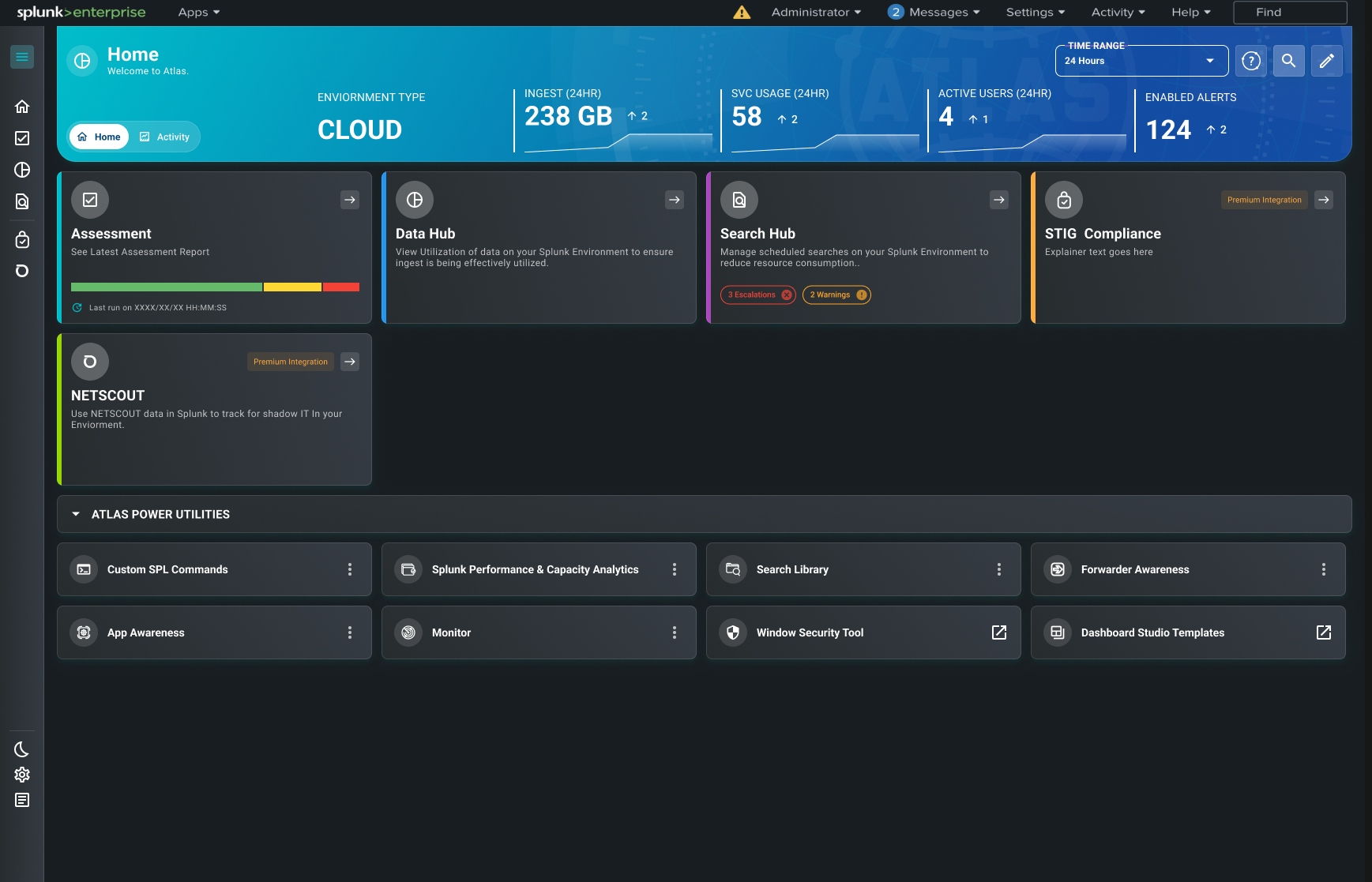
Instead of a set of individual utilities, Atlas 4.0 organized every capability around a specific domain: Search Hub for scheduled-search governance, Data Hub for data utilization and ownership, Assessment for environment health. A flat list of features doesn't scale, but a small number of clear domains does, since every new capability gets an obvious home instead of becoming one more item in a growing menu.
The result was a product that could keep growing without feeling more fragmented to the people using it, which was exactly the problem the original interface had created.
From Data Display to Decision Support
Atlas 4.0 introduced one pattern everywhere findings appeared: Problem → Evidence → Recommended action → Result. A flagged scheduled search would show why it was flagged, let the user check the reason, and then offer the specific action (triage, reschedule, disable, auto-balance) that resolved it, without leaving the view.
That mattered because the original interface made users do that translation themselves, jumping between screens to figure out what a finding meant and what to do about it. Building the translation into the interface turned raw operational data into something closer to a recommendation people could act on right away.
Designing for Two Very Different Users at Once
Atlas serves a leader who needs a five-second read on environment health, and an engineer who needs the exact search, dataset, or threshold behind a finding. Neither is well served by an interface built for the other. So every screen was split into four layers: Summary (KPIs, status, trends), Investigation (filters, tables, detail panels), Action (the controls to resolve an issue), and Evidence (the measured values and checks behind it).
Keeping those layers visually distinct, instead of blending them into one dense view, is what let Atlas avoid choosing between a simple dashboard and a technical tool. A leader could stop at the summary; an engineer could go straight to evidence without the summary getting in the way. Same fix as the domain-based navigation, just applied to a single screen.
Phase 3: Atlas 5.0 and Product Refinement
From "How Do We Build It" to "How Do We Make It Easy"
With the React foundation in place, the question changed. Atlas 4.0 had to figure out how to build the experience at all. Atlas 5.0 had the harder job of making it feel complete, safe, and easy to use. That shift showed up in product decisions as much as visual polish: moving distribution to Splunkbase and making Assessment available without a license key removed friction before anyone even reached the interface.
Solving access and setup first mattered because a polished UI doesn't help much if getting to it is the hardest part. Fix that first, and the interface work that follows actually reaches more people, instead of only the users who'd already cleared a harder bar to get there.
Giving the Product a Home, and a Visual Language
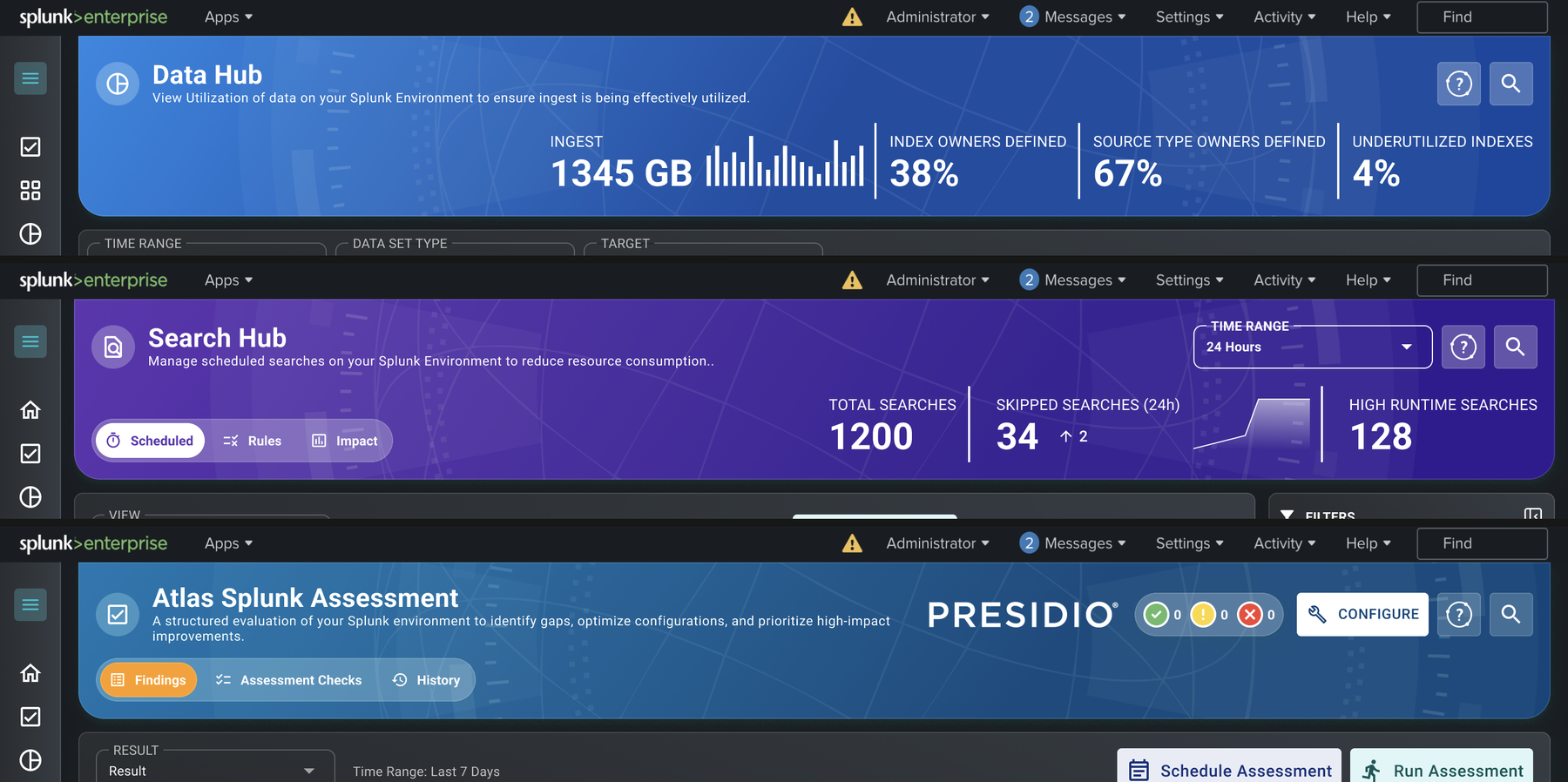
5.0 also gave Atlas something 4.0 never had: a home page. There had been no single place that oriented someone in the product before, so 5.0 added one, with a gradient header banner over each domain and a distinct color per feature area, blue for Data Hub, purple for Search Hub, blue for Assessment, so someone could recognize where they were headed before they even opened it.
That color language carried through into each domain's own header once you got there, so it read as a consistent visual system rather than a coat of paint on just the entry point.
Explainability Builds Trust in Recommendations
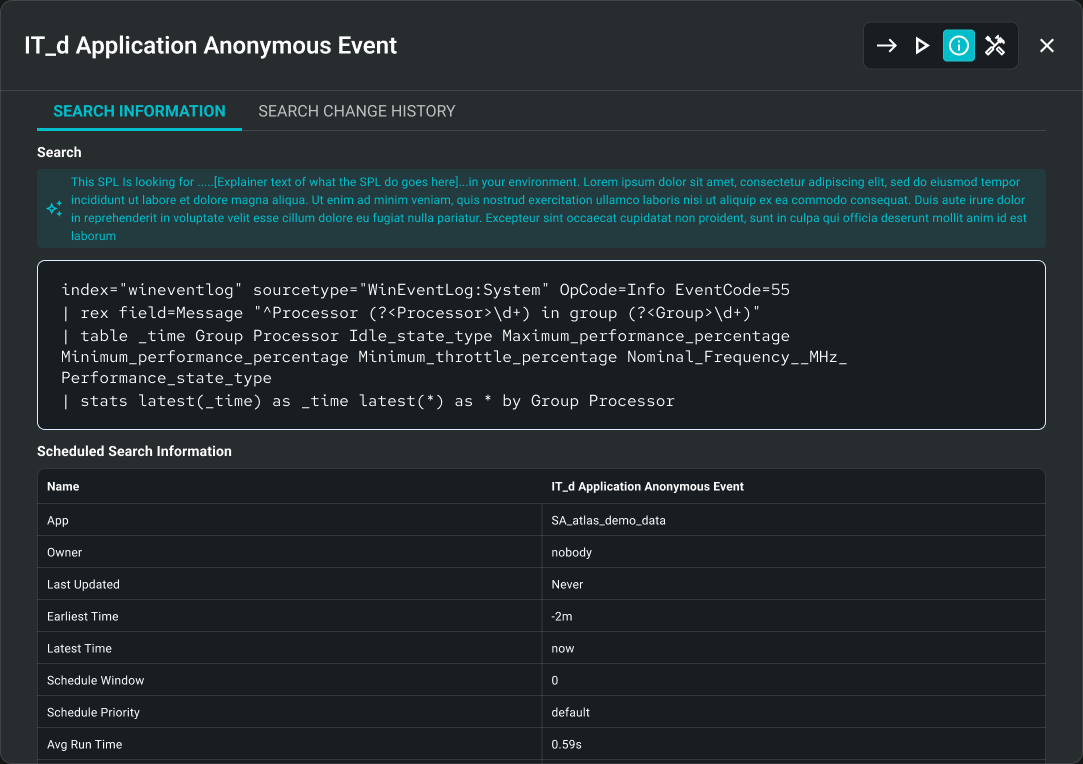
A health score or utilization status only matters if people trust it, and trust comes from being able to see why the number is what it is. Atlas 5.0 kept connecting every status and score directly to the checks, thresholds, and measured values behind it, so a result never had to be taken on faith.
That followed straight from what the original interface got wrong. Dense tables showed data without context, and Atlas 4.0's Problem → Evidence → Action pattern had already shown that connecting a finding to its evidence changed how usable it felt. 5.0 just made that the default for every recommendation, not just the ones that needed it most.
What Changed for Users
Across all three phases, the real shift wasn't visual, it was in what the product actually did for people. The original Atlas helped users access operational data they'd otherwise have had to query for themselves. Atlas 4.0 organized that access around clear domains and connected findings to actions. Atlas 5.0 made the whole path, from status to evidence to the right action, feel deliberate instead of assembled.
The result is a product people can start from an overview instead of a blank technical screen, jump from a KPI straight to its supporting evidence, understand why something was flagged, act in the same workflow, and come back over time to see if things actually improved. None of that meant giving up the technical depth Splunk users expect. It meant organizing that depth around what they were actually trying to decide.
"A successful redesign does not discard the value of the original product. It preserves the domain expertise users depend on while making the path from insight to action clearer."